Showing posts with label unlimited. Show all posts

Sunday, August 22, 2010

Free unlimited SMS on your mobile

Do you regularly use SMS, are many of your friends outstation, and you send a lot of SMS to them.  Now, you would not ever need to get an SMS pack or pay for SMS.  Just download the mobile Java application and send SMS to your friends as you would usually do from your mobile FREE for ever.  So, stay connected, even when you step out.
  • The application is very very small, just of 28KB, and very simple to install.
  • Special features of this application is you can send multiple group message to your friends
  • As well as send SMS to your friends from your phone book.
  • Using this application you can also upload and backup your phonebook contacts.
  • So what are you waiting for just go ahead and download the application now.


You can use this service in two ways. You can now send SMS with or without a GPRS connection on your mobile.
1) SMS with GPRS Connection

The "VIA GPRS" feature of 160by2 allows you to send Free SMS from your GPRS enabled device. The additional features include : 
a) No need to Login (even if you exit the application) every time you want to access 160by2. It keeps you loggedin until you logout. 
b) You can access all your contacts from 160by2.com account as well as from your phone book 
c) You can now upload and backup your phone book on 160by2.
2) SMS without GPRS Connection

Don't have an Internet connection on your mobile? Still you can Enjoy SMSing. The valuable "Via SMS" feature of 160by2 allows you to send SMS anywhere in India without an active GPRS connection.
a) There is no need to Login . User is validated based on his mobile number. 
b) You can send SMS upto 10 recipients at a time and shall be charged only for cost of ONE SMS as per your tariff plan.
c) You can include recipients as individual mobile numbers or as 160by2 Group Names.
_________________________________________________________________________
Install 160by2 Via Mobile 
1) Point your phone's browser to http://www.160by2.com/app 
2) Answer 'Yes' to all installation messages and enjoy Free SMSing, right on your mobile phone! 
Problems connecting? Make sure your phone is correctly set up for Internet access.
Install 160by2 Via PC 
Please login before starting download
1) Select your mobile from the below list and click to download the .jar and .jad files. 
2)Transfer these files to your phone, and install them according to your phone's installation procedure.
To download the application Just copy and paste this link in your mobile browser http://www.160by2.com/app

Sunday, June 20, 2010

Call any mobile in world for free for unlimited minutes unlimited times

Note: Before you try it, let me make you aware, that setting up this system is going to be tough, and those with high level patience are requested to try it, otherwise do not try this.  I started setting it up at 10pm night and finished setting up at 6:30 am morning, so your patience would be highly appreciated.  Share this method with your friends and family who have that much of patience.  If you are successful in making call, then I request you to share my website https://www.healthywealthyindia.com/ as your status message of your facebook/orkut/twitter accounts.
Click on the like button below to show your support to us
Share on orkut 
Follow me on Google Buzz to get word of the day, jokes, wallpapers, and amazing news. Just Click the Follow Button Follow on Buzz


What all you will need:
Google ID
Hotshield
Rebtel Account
IPKall number
SIP Call number
Express Talk
Headphone with Microphone

Step1:  Note Update:  As you must be aware that Google Voice has become Open now onwards, and there is no need to request an invitation, so now you just got to install Hotshield to protect your IP address, to download hotspot shield go to the following link  https://www.anchorfree.com/downloads/hotspot-shield/ and install it.
Then signup to Google Voice Account. 

Step2:  Go to the TPAD website to obtain a Free SIP number, signup at https://secure.tpad.com/signup/
Note down your TPAD number somewhere.

Step3:  Once you obtained the free SIP number from TPAD, go to the following website https://phone.ipkall.com/
Signup to this website and write the following during the signup form:
1. Choose your account type:  select SIP
2. Choose area code for your IP call number:  default 253
3. SIP Phone number:  your TPAD SIP number here.
4. SIP Proxy number:  sip.tpad.com
5. email address:  your email address here
6. password: anything combination of words and number
7. Enter captcha image two words in the box.

Step4: Check your email, you must have a Washington State's free phone number for your IP phone.  Note that number at some notepad or keep it handy.


Step5:  Now download Express Talk and set up your SIP information as per the instrutions below:
How to Install the Express Talk Softphone


How to setup Tpad on the easy to use Express Talk Softphone (Basic Edition).

This is a very good softphone and very simple to setup and has a number of great wizards (audio / network).
Also, use this if you are getting Timeout / Failed to connect / One way audio problems.

How to setup Free Express Talk Softphone (Basic Edition) with Tpad

1. Download from https://www.nch.com.au/talk/index.html (Basic Edition)

(Compatible with Windows 98/ME/2000/XP/2003/Vista or later)

2. Install and follow simple setup guides.

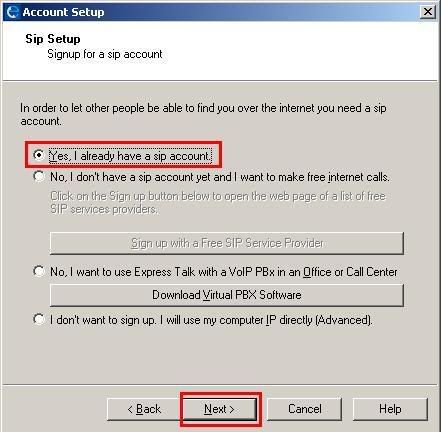
3. When this screen appears, select "Yes, I already have SIP Account" and then NEXT.


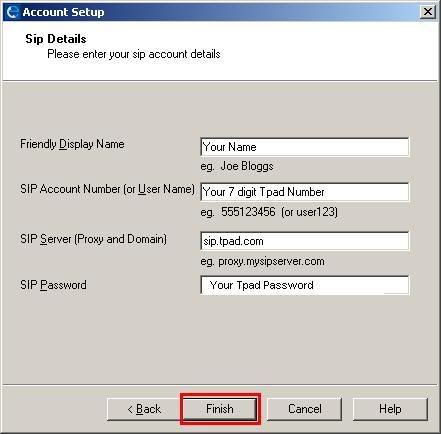
4. Then when this screen appears enter


Your Name: Enter you display name


SIP Account Number: Your 7 digit Tpad Number e.g 1126789

SIP Server: sipx.tpad.com

SIP Password: Your Tpad Password (used when you made an account)

Then click FINISH.
How to make Free Tpad to Tpad (IP to IP / VoIP to VoIP)
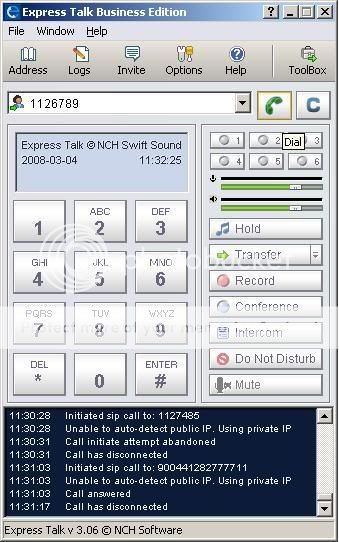
Just dial the 7 digit Tpad Number of your friend, anywhere in the World and press the Green Call Button.
Attach your microphone and headset with your computer and make the free call to 121 to test your setup is working fine.

Step6:  Now go to your Google Voice invitation, and set up your account to obtain a Google Voice Number, when asked for a local telephone number to receive the verification call, then provide your IPKall Washington local number, and click Call Me Now.

You will receive a call on your computer at Express Talk, receive the call and enter the two digit code to verify your number, thats great now you have activated your Google Voice Account Congratulation. Note down your google voice number

Step7:  Now the final step to make international calls for free, go and signup to Rebtel https://www.rebtel.com/en/Utility-Pages/Join-flow/Join/
Enter the following in the form:
First Name:  Your name
Second Name: Your last name
email:  Your email
Country:  USA
your phone number:  Enter your Google Voice number enter +1 for america's code
chose pin:  enter any 4 digit numerical number

Step8: Now add any of your friends mobile number in your Rebtel account to get a local number of washington.  Did not got me, look what Rebtel does is provide you a local number of washington in place of any international number, so that when users call local number, they get to talk to international numbers at cost of local numbers, and calling local numbers of washington is free via Google Voice, so when you make a call via google voice to the local number (which is your friend's international number) you get to talk to your friends for free.  Now add your friend's number with internatioal code ie. +919xxxxxxx and obtain and note the local number that should be like 7xxxxx.

Step9:  Add this local number in the contact of your Google Voice and click the call button, you will receive an incoming call at Express Talk, receive the call, then you will here the dialing ring to your friend, when your friend receives the call, then you are up and ready to call him.

Note:  Do not misuse this service, just think of it as a mean to be in connect with your loved ones and enjoy the free call.

Visit us at https://www.healthywealthyindia.com/ and help me promote the website.  To improve your English vocabulary so you can learn online tech tutorials easily visit https://www.vocabularytoday.com/  Best Regards
Click on the like button below to show your support to us


If you liked this article then share it with your friends on facebook so that they can also call you free

Share on orkut

Once you have obtained the Google Voice number, you can call me and leave a voice message to me by just clicking the below Call Me button and enter your name and your Google Voice number and press Connect me.